ProductivityExample data
School Tracker
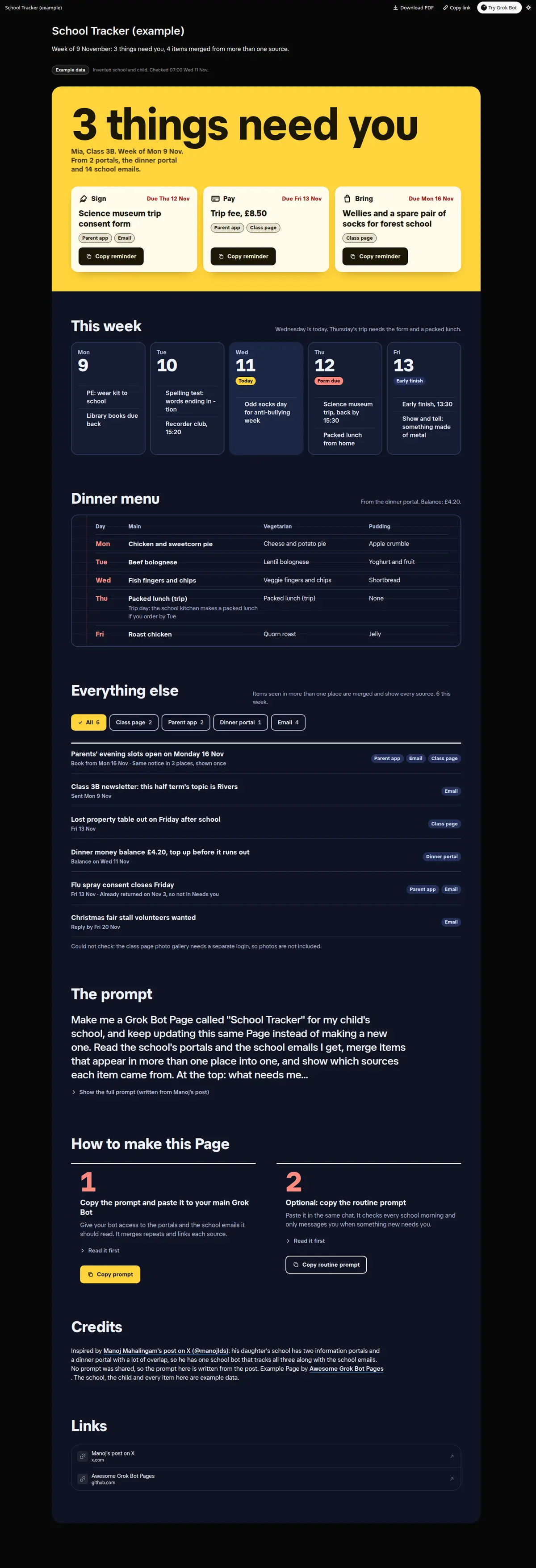
Two school portals, a dinner portal and school emails merged into one week: what needs you with due dates and a Copy reminder each, the week day by day, this week's dinner menu, and every item with its sources and a source filter.
Prompt
Paste into Grok Bot
Make me a Grok Bot Page called "School Tracker" for my child's school, and keep updating this same Page instead of making a new one. Read the school's portals and the school emails I get, merge items that appear in more than one place into one, and show which sources each item came from. At the top: what needs me this week (forms to sign, payments, things to bring), each with its due date and a Copy reminder button. Then this week day by day: events, trips, early finishes and what to bring. Then this week's dinner menu from the dinner portal. Then everything else as a list I can filter by source. Use only what the portals and emails say, link back to each source, and say when something could not be checked. Leave out other children's names.
Routine prompt (optional)
Keeps the Page updated
Create a routine for my "School Tracker" Page: every weekday at 07:00, check the school portals and new school emails, merge duplicates, update the same Page, and send me one line only if something new needs me this week or a due date is tomorrow.
How to use it
- Copy the prompt and paste it into a chat with Grok Bot.
- Swap in your own bots, accounts or data sources where the prompt asks for them.
- If the prompt does not create a refresh routine, ask Grok Bot for one.
- To share your version, make a copy with mock data and make that copy public. Then get it listed.