ProductivityExample data
Done Tracker
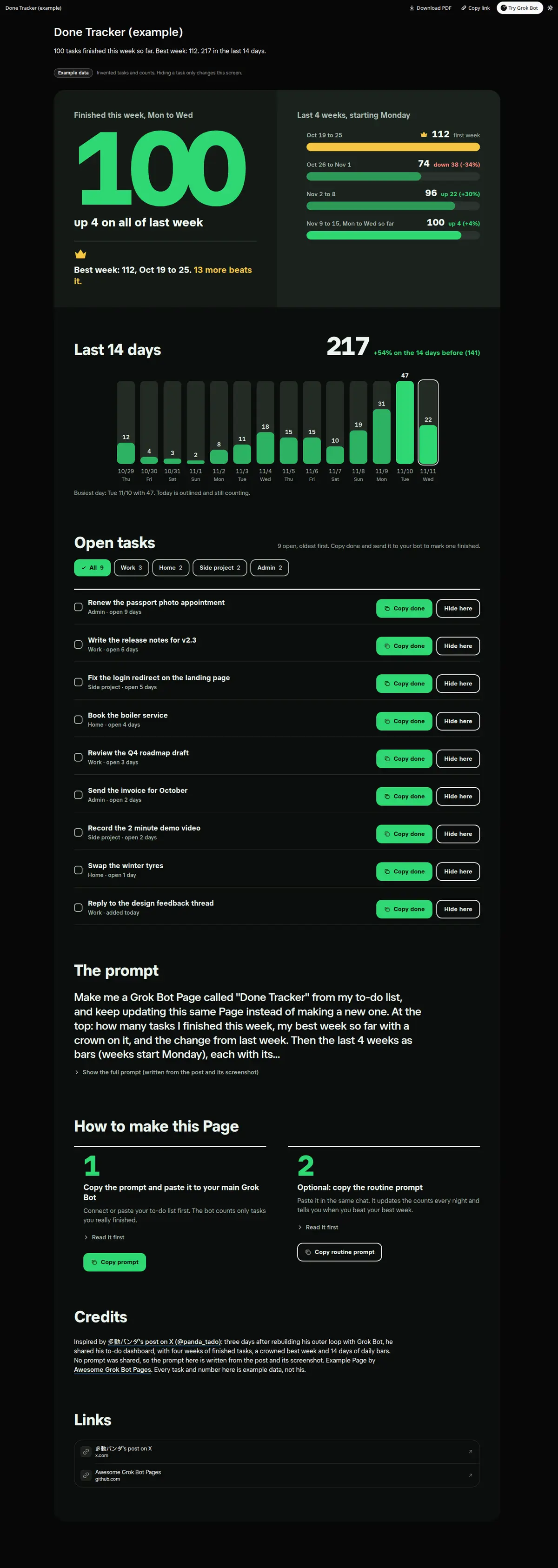
Tasks finished, week by week: this week's total against a crowned best week, 4 weekly bars with the change from the week before, 14 daily bars with a 14-day total, and open tasks by area with a Copy done button each.
Prompt
Paste into Grok Bot
Make me a Grok Bot Page called "Done Tracker" from my to-do list, and keep updating this same Page instead of making a new one. At the top: how many tasks I finished this week, my best week so far with a crown on it, and the change from last week. Then the last 4 weeks as bars (weeks start Monday), each with its total and the change from the week before. Then the last 14 days as bars of tasks finished per day, with the 14 day total and the change from the 14 days before. Then my open tasks grouped by area, oldest first, each with a Copy done button that copies a short message I can send you to mark it finished. Use my local time zone and only my real tasks; if a day has no data, show it as empty instead of guessing.
Routine prompt (optional)
Keeps the Page updated
Create a routine for my "Done Tracker" Page: every night at 23:30, read my to-do list, count what I finished today, update the weekly and 14 day bars and my best week on the same Page, and refresh my open tasks. If I beat my best week, send me one line.
How to use it
- Copy the prompt and paste it into a chat with Grok Bot.
- Swap in your own bots, accounts or data sources where the prompt asks for them.
- If the prompt does not create a refresh routine, ask Grok Bot for one.
- To share your version, make a copy with mock data and make that copy public. Then get it listed.