Bot ManagementExample data
Bot Team Usage
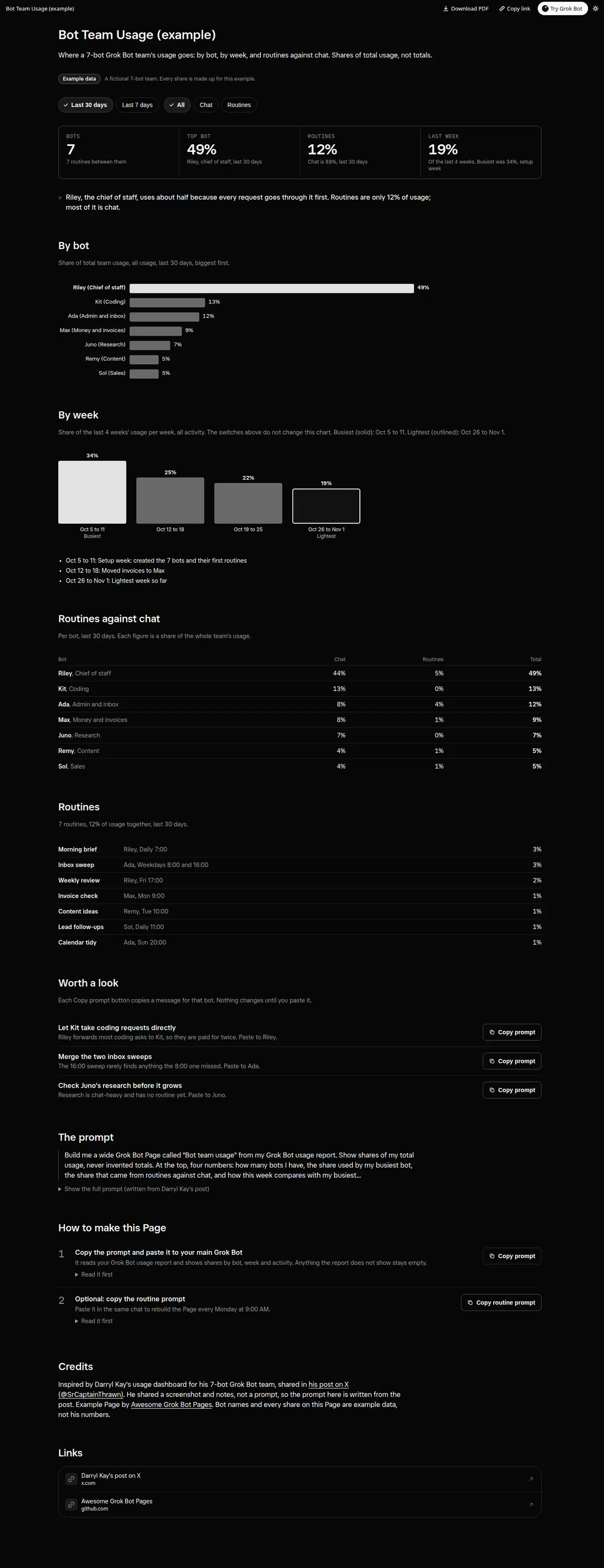
Where a 7-bot team's usage goes: share by bot, by week and routines against chat, with period and activity switches and Copy prompt tips to cut waste.
Prompt
Paste into Grok Bot
Build me a wide Grok Bot Page called "Bot team usage" from my Grok Bot usage report. Show shares of my total usage, never invented totals. At the top, four numbers: how many bots I have, the share used by my busiest bot, the share that came from routines against chat, and how this week compares with my busiest week. Then a By bot chart: one bar per bot with its share of usage, biggest first, and a one-line note on why the top bot uses the most (for example a chief of staff that routes everything). Then a By week chart for the last 4 weeks, with my busiest and lightest week labeled and what happened that week if you know it. Then routines against chat for each bot, and a list of my routines with their share, so I can see which ones barely register. Add a period switch (last 7 days, last 30 days) and an activity switch (All, Chat, Routines) that update every number, chart and list. End with up to 3 suggestions, each with a Copy prompt button I can paste to the right bot; the Page never changes a bot or routine itself. Every control must really work on the Page; no buttons that do nothing. Anything the report does not show stays empty instead of a guess. Then create a routine that rebuilds the Page every Monday at 9:00 AM.
How to use it
- Copy the prompt and paste it into a chat with Grok Bot.
- Swap in your own bots, accounts or data sources where the prompt asks for them.
- If the prompt does not create a refresh routine, ask Grok Bot for one.
- To share your version, make a copy with mock data and make that copy public. Then get it listed.