Payments and FinanceExample data
Renewals and Due Dates
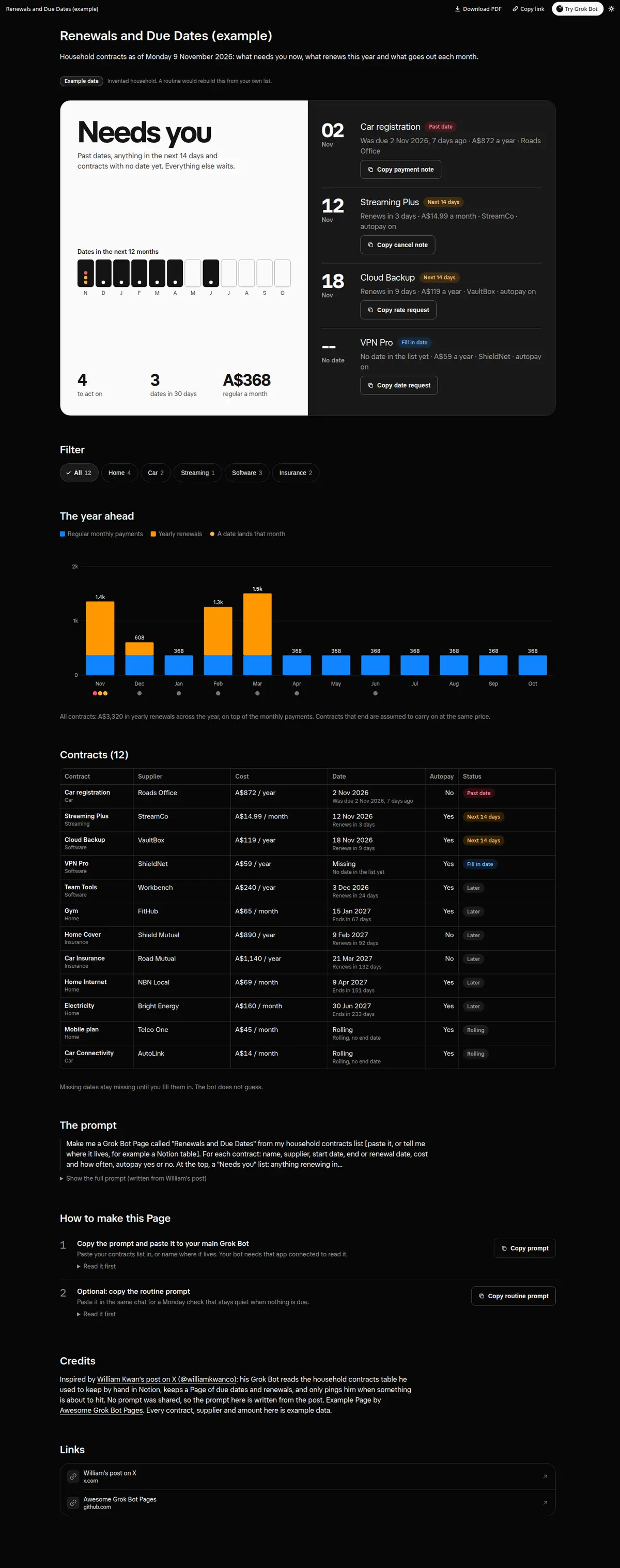
Household contracts and subscriptions in one place: a Needs you list for renewals in the next 14 days, missed dates and missing dates with a Copy button for each supplier note, a 12-month renewal timeline, monthly spend split into regular and renewals, and category filters.
Prompt
Paste into Grok Bot
Make me a Grok Bot Page called "Renewals and Due Dates" from my household contracts list [paste it, or tell me where it lives, for example a Notion table]. For each contract: name, supplier, start date, end or renewal date, cost and how often, autopay yes or no. At the top, a "Needs you" list: anything renewing in the next 14 days, anything past its date, and anything with no date yet, each with a Copy button for a short note to the supplier (cancel, renegotiate or ask for the date). Then a 12-month timeline with each renewal as a marker, and a bar chart of what goes out each month split into regular and renewals. Let me filter by category. Use only what is in my list; mark missing dates as missing, do not guess.
Routine prompt (optional)
Keeps the Page updated
Create a routine for my "Renewals and Due Dates" Page: every Monday at 08:00, re-read my contracts list, rebuild the Page, and message me only if something renews within 7 days, a date has passed, or a new contract has no date. Otherwise stay quiet.
How to use it
- Copy the prompt and paste it into a chat with Grok Bot.
- Swap in your own bots, accounts or data sources where the prompt asks for them.
- If the prompt does not create a refresh routine, ask Grok Bot for one.
- To share your version, make a copy with mock data and make that copy public. Then get it listed.