MarketingExample data
Post Ideas Board
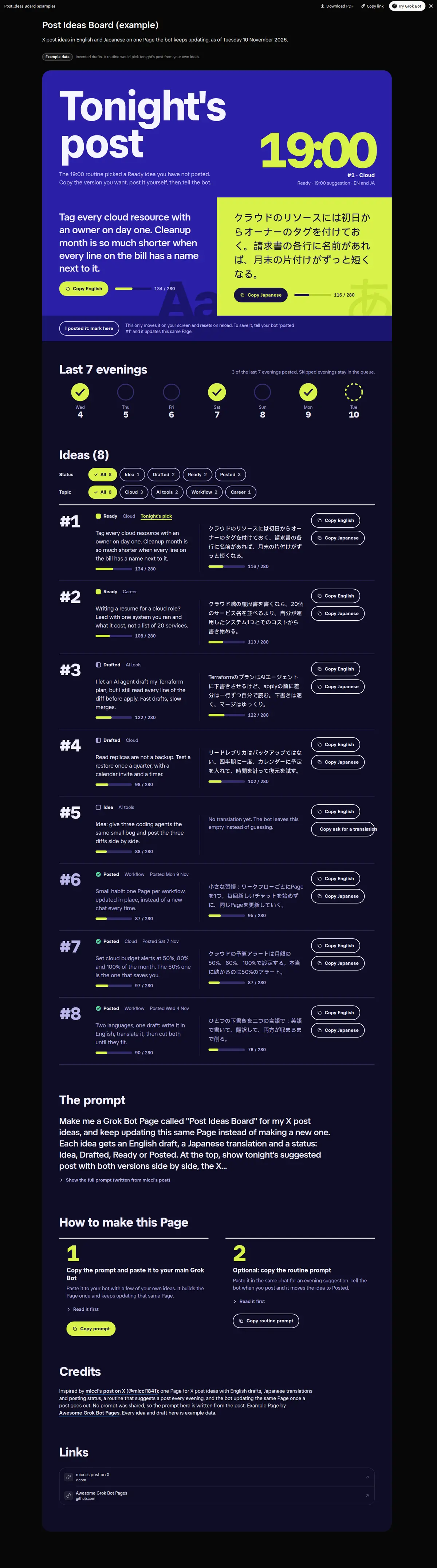
X post ideas in two languages on one Page that keeps updating: tonight's suggestion with English and Japanese side by side, X character counts and Copy buttons for each version, idea cards by status (Idea, Drafted, Ready, Posted) with topic filters, and a 7-evening posting strip.
Prompt
Paste into Grok Bot
Make me a Grok Bot Page called "Post Ideas Board" for my X post ideas, and keep updating this same Page instead of making a new one. Each idea gets an English draft, a Japanese translation and a status: Idea, Drafted, Ready or Posted. At the top, show tonight's suggested post with both versions side by side, the X character count for each, and Copy English and Copy Japanese buttons. Below, every idea as a card with both versions, its status, a topic tag and the same two Copy buttons, with filters by status and topic. Add a strip of the last 7 evenings showing which ones I posted. When I tell you I posted one, move it to Posted on this same Page. Use only my own ideas; if there is no translation yet, say so instead of guessing.
Routine prompt (optional)
Keeps the Page updated
Create a routine for my "Post Ideas Board" Page: every evening at 19:00, pick one Ready or Drafted idea I have not posted, polish the English draft and its Japanese translation, make it tonight's suggestion on the same Page, and send me one line with the English draft. If I tell you I posted it, mark it Posted on the Page.
How to use it
- Copy the prompt and paste it into a chat with Grok Bot.
- Swap in your own bots, accounts or data sources where the prompt asks for them.
- If the prompt does not create a refresh routine, ask Grok Bot for one.
- To share your version, make a copy with mock data and make that copy public. Then get it listed.