Mission ControlExample data
Morning Mission Control
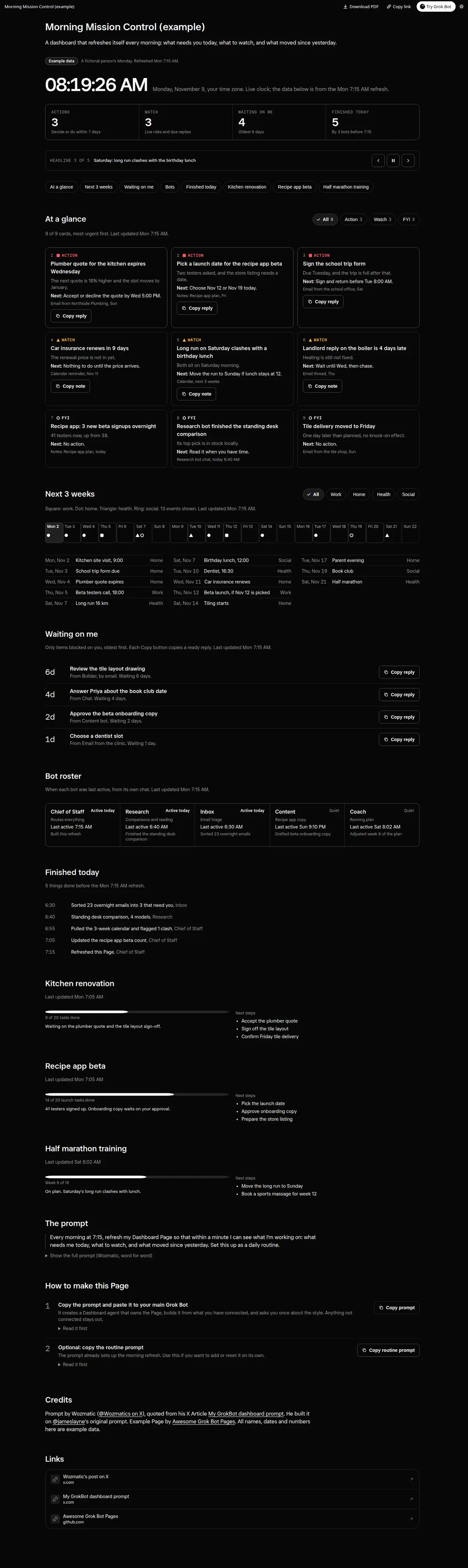
A morning command center with a live clock, a one-at-a-time headline ticker, ACTION, WATCH and FYI cards with Copy buttons, a 3-week calendar, what is waiting on you, a bot roster, what finished today and per-project status.
Prompt
By Wozmatic, from his X Article
GOAL
Every morning at 7:15, refresh my Dashboard Page so that within a minute I can see what I'm working on: what needs me today, what to watch, and what moved since yesterday. Set this up as a daily routine.
ACCESS
Make the Page easy to open at any time, without hunting for the link:
1. Create a new Grok Bot agent called Dashboard and make it the owner of my Dashboard Page. Set the refresh up as that agent's own routine, so it runs the refresh and makes any changes to the Page that I ask for. Whenever I message it, even "hi", it also replies with one line holding a link to the Page, so I'm always one tap away, including on the mobile app.
2. Tell me to pin the dashboard in my Library on desktop. I open the Library, click the three dots on the Page's row and choose Pin. It stays at the top under Pinned.
3. As a fallback, tell me to bookmark the Page link in a web browser.
Create the Page once, on the first run, and always update that same Page after that so the link never changes. Never create a second Page or a copy, because that would break the Dashboard agent's link, the Library pin and the bookmark. If the link ever changes, tell me and update the Dashboard agent.
LAYOUT AND STYLE
A full-colour, dark mission-control layout:
A header with a large live clock in my time zone and 4 key-number tiles.
A scrolling ticker of headline items, which pauses on hover.
Coloured pills that jump to each section.
Numbered "At a glance" cards colour-coded by type: ACTION (red), WATCH (amber), FYI (blue).
Progress rings and bars where there's real data to show.
A 3-week calendar strip and timeline, colour-coded by event type.
A "Waiting on me" list.
A bot roster grid showing when each of my bots was last active.
A "Finished today" timeline.
One section per active project or area of my life, each with its own "Last updated" stamp.
Once it's built, keep the colour palette, card styles, glow and accents, spacing and section order. Change them only when I ask.
HARD LIMITS (never break these)
1. Edit only my Dashboard Page. Never create a second Page, and never rewrite the layout or change the style unless I ask.
2. On each refresh, change only the content and data, never the structure or section ids.
3. All sources are read only. Send no emails or messages, create no drafts, post nothing in chat tools, and create, edit, move or delete nothing in my files or any connected app.
4. No secrets on the Page (passwords, codes, full account or card numbers; last 4 digits are fine).
5. No em dashes anywhere.
STEP 0: FIRST RUN ONLY, STYLE QUESTION (ask once, never again)
On the very first refresh, before building or saving anything, ask me one question: am I happy with this colour scheme, card colours and visual style, or would I like anything changed (palette, accent colours, contrast, card style, density)? Apply my answer, then save in your memory that the style question has been asked. If there's no answer, use the layout as it is. Never ask this again on any later run. After this, change the style only when I ask for it directly.
STEP 1: DECIDE THE SCOPE (my local date)
Refresh every section on every run, covering everything since the previous refresh.
STEP 2: GATHER (read only, newest first)
Use every source I've connected to you, and skip any I haven't. For example:
My notes and documents (such as Google Drive, Notion or OneDrive) for each active project or area of my life. These are the main source.
My existing Pages.
Email (such as Gmail or Outlook) since the last refresh, for replies, deadlines, payment requests and decisions on open items.
Chat and messaging (such as Slack or Teams) since the last refresh, for mentions, direct messages and anything waiting on me.
Task and project tools (such as Notion, Trello, Asana or Linear) for open tasks, due dates and anything assigned to me.
My calendar for the next 3 weeks.
Each of my bots' recent chats, for when it was last active and what it finished.
STEP 3: WRITE THE CONTENT
Every item comes from a source read this run, with a date. Tag anything inferred, stale or unconfirmed as "Unverified", with a one-line reason. Never invent numbers, names or chart data. Leave a chart out rather than fake one.
At a glance has at most 9 cards, ranked by urgency:
ACTION: I must decide or do something within 7 days.
WATCH: a live risk, a date, or a reply that's due, with nothing for me to do yet.
FYI: a change worth knowing, with nothing to do.
Each card says what changed, why it matters, and the next step or deadline, with a source and date.
Waiting on me lists only items blocked on me, oldest first, with how many days each has waited.
Recalculate all countdowns against today's date in my time zone.
STEP 4: FALLBACKS
If a source can't be read, keep the last values, add a "Not refreshed today" note with the reason, and keep going. Never blank out a section. If a bot's chat can't be read, carry over its last-active time and mark it as carried over. If I haven't connected a source, leave it out rather than flag it.
STEP 5: CHECK, THEN SAVE
Before saving, check that every refreshed section has a "Last updated" stamp, the page-level updated time is set, every jump pill reaches its section, the header counts match the cards, colours match the card types, and there are no em dashes or secrets. Then save.
STEP 6: MORNING CHECK-IN
After saving, send me one short check-in with a link to the Page and up to 2 questions, asked one at a time in chat, or on voice if I'm on a call with you:
1. Content: is anything missing, wrong or no longer relevant?
2. Priority: should any card move up, move down or come off?
Apply my answers on the next refresh, and keep everything else as it is. If the refresh fails or the Page can't be edited, say so in the check-in.
How to use it
- Copy the prompt and paste it into a chat with Grok Bot.
- Swap in your own bots, accounts or data sources where the prompt asks for them.
- If the prompt does not create a refresh routine, ask Grok Bot for one.
- To share your version, make a copy with mock data and make that copy public. Then get it listed.